

Leads & enquiries
Contact form
A way for people to get in touch.
3 questions · about 1 min
See the template
On Small team and up
Leave requests, purchase orders, bookings that need a second look. New responses wait for someone on your team, and everyone hears the outcome.
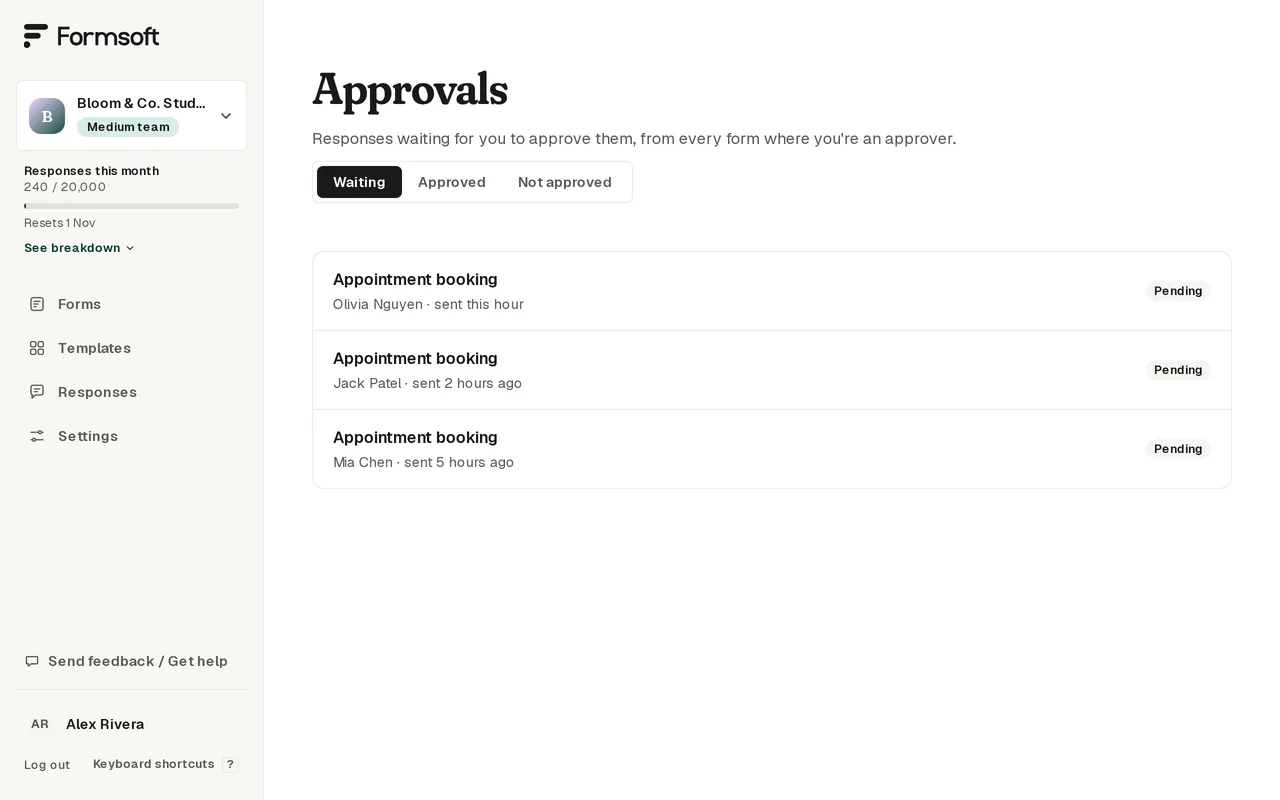
Approvers get an email for each new response and an Approvals page with everything waiting for them.
The person who filled in the form gets an email with the decision and your note. You can turn that off per form.
Filter responses by approval, see it in CSV downloads and the API, and get a webhook the moment a decision is made.
Open the form's Settings and turn on approvals.
Choose who on your team can approve.
Decide from the Approvals page or the response itself.
Leads & enquiries
A way for people to get in touch.
3 questions · about 1 min
See the template
Bookings
People pick a free time from your hours and get a calendar invite.
4 questions · about 1 min
See the template
EventsSmart logic
Know who's coming, how many, and any dietary needs.
5 questions · about 1 min
See the template
Small team, Medium team and Business, because it needs more than one person.
Workspace owners and admins, plus any teammates you choose in the form's settings.